
No owner
Queue, claim, assignment, acknowledgement, and resolution states make responsibility visible.
Escalate / Workspace
Direct answer
Workspace is the governed exception surface for support that needs a person. It carries the transcript, handoff summary, customer history, SLA state, and ownership controls into one operational view.
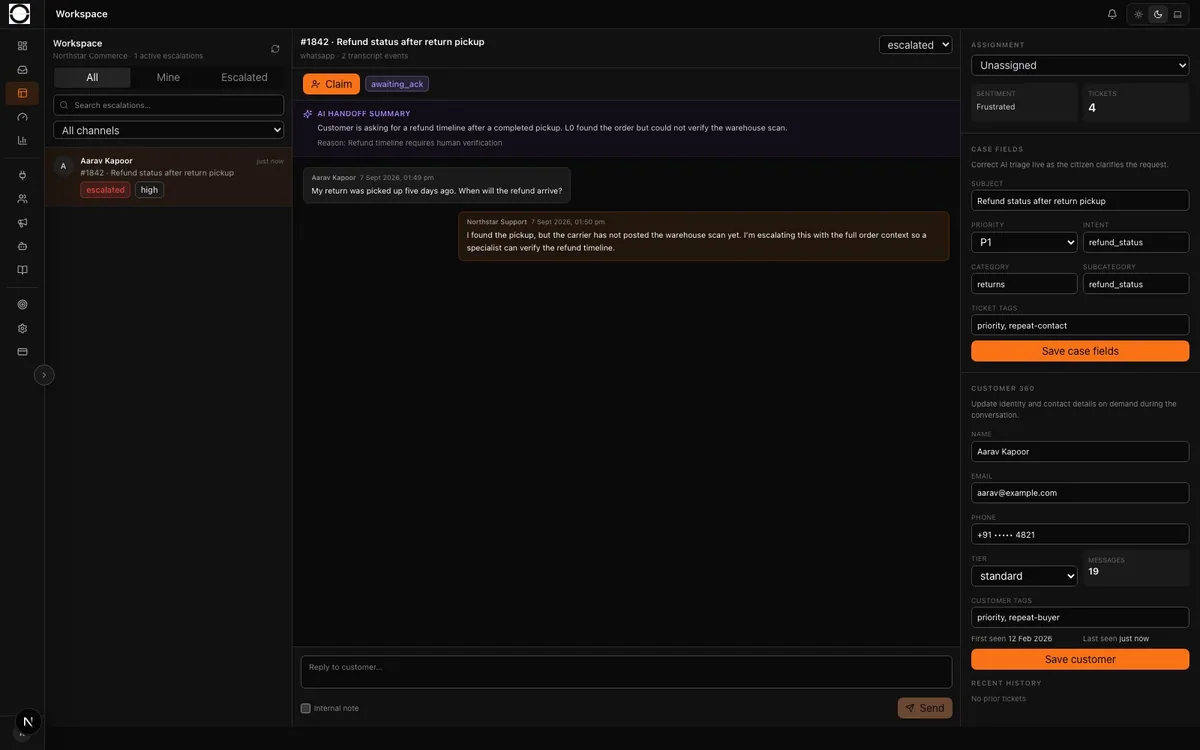 01 Claim and SLA state 02 Handoff summary 03 Customer context
 The handoff gap
When context is lost, customers repeat themselves, agents reconstruct history, and ownership drifts between queues. Workspace keeps the support evidence attached to the exception.
Queue, claim, assignment, acknowledgement, and resolution states make responsibility visible.
Transcript, handoff reason, customer fields, tags, and prior interactions stay together.
Resolution state and notes become inputs to the configured Quality eligibility path.
Mechanism
A handoff enters the queue with priority, reason, summary, transcript, and customer context.
An operator claims or assigns the case and acknowledges the current support state.
The person replies, adds internal context, updates fields, or returns eligible work to automation.
Resolution records the outcome and sends configured eligible work into Quality.
Operational control
Workspace is useful because state and evidence remain visible throughout the human part of the loop.
View open exceptions by assignment, channel, priority, and operational state.
Move from unowned work to a named operator through explicit case actions.
Keep operator-only context separate from customer-facing replies.
Resume a configured workflow only when the case is eligible and the boundary is explicit.
Demonstration scenario
The exception is visible with its channel, priority, status, and current assignment state.
The operator sees the previous messages, handoff summary, and customer history.
The operator claims the case, verifies status, replies, and records the resolution.
The resolved interaction becomes eligible for the configured Quality workflow.
Measures
Time between escalation creation and a named operator claiming or receiving the case.
Open work approaching or exceeding the configured response or resolution boundary.
Customers returning for the same support intent within the defined measurement window.
Direct answers
It does not have to. Workspace is an OpenOS exception surface today. Coexistence with an existing helpdesk is designed through scoped APIs and deployment-specific responsibilities.
Yes, where the published workflow and case state allow a governed return-to-automation path.
Configured eligible resolved interactions, along with the conversation and operational evidence needed by the scorecard.
Tailored walkthrough
A tailored walkthrough for Support/CX, operations, and technology leaders—using your channels, responsibilities, and success measures.
Prefer email? sales@openost.com