See what is drifting. Make the next move accountable.
OpenOS connects first-contact resolution, human exceptions, quality evidence, and leadership decisions—without replacing the providers and systems your operation already uses.
Your tools see tickets. Your leaders need the operating story.
Support signals live across channels, queues, workflows, quality systems, and provider consoles.
The costly part is not finding another chart. It is correlating the evidence early enough to decide what changes next.
The bot, agent, and quality team each see a different version of the interaction.
OpenOS keeps the conversation, handoff, case state, quality evidence, and decision frame connected.
02 / Hidden drift
Stable volume can hide falling containment, unowned exceptions, and repeated failure.
Trinetra correlates those signals into a material pattern leadership can inspect.
03 / Unowned insight
A dashboard can show the problem without creating accountable follow-through.
A Decision Card proposes the responsible role and deadline; selected action becomes a managed task.
One incident. Five product moves.
Follow the evidence from signal to decision.
Explore a single return-status scenario across connection health, Agent Studio, Workspace,
Quality, and Trinetra. Every screen is from the real OpenOS application with controlled demonstration data.
01 / Signal
A repeated support intent starts to drift.
OpenOS observes the support evidence already entering the operation: messages, cases, workflow states, assignment, and quality results.
Return-status contacts rise
L0 containment falls
Unassigned cases accumulate
Signal coverageDemonstration data
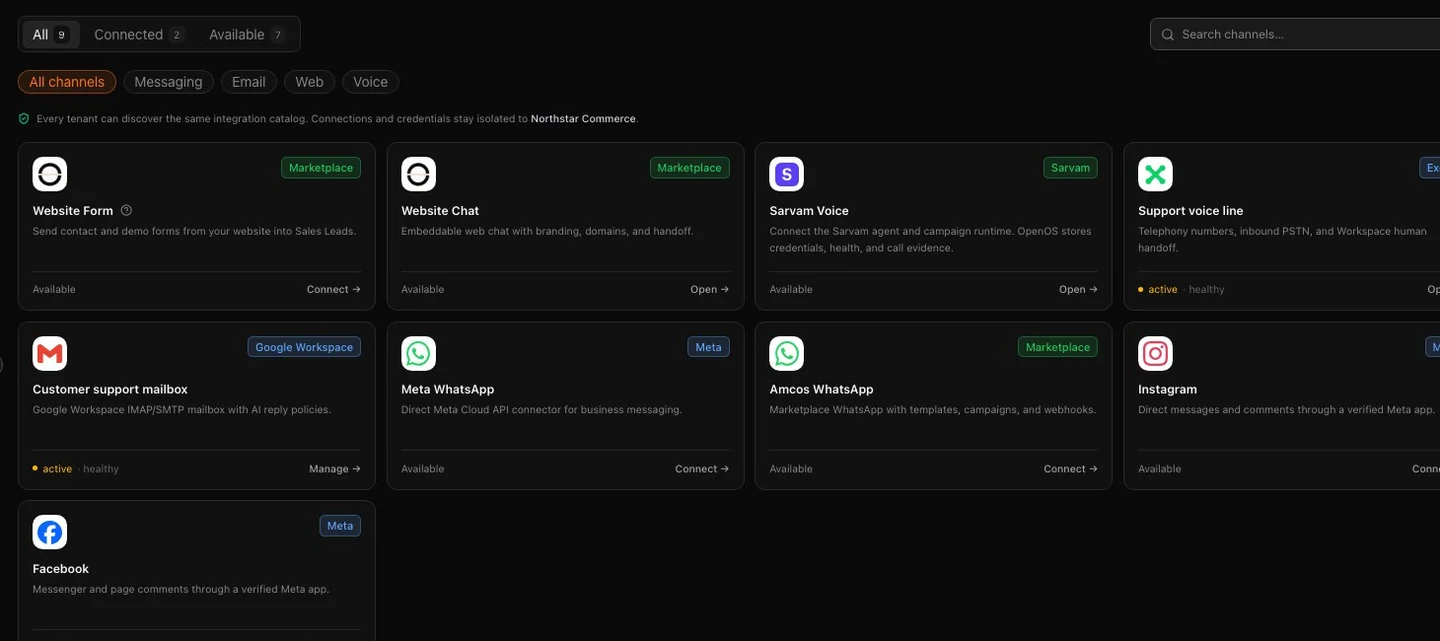
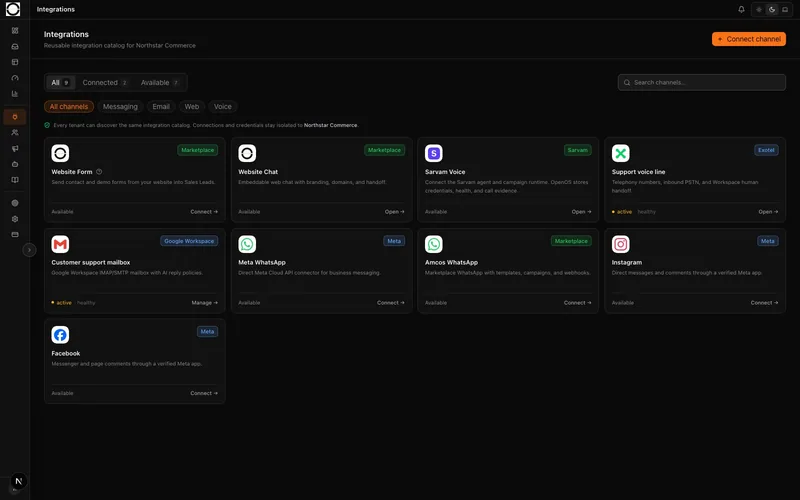
01Connection health
Connections remain customer-owned. OpenOS records normalized evidence and connection health.
02 / Resolve
L0 works inside published boundaries.
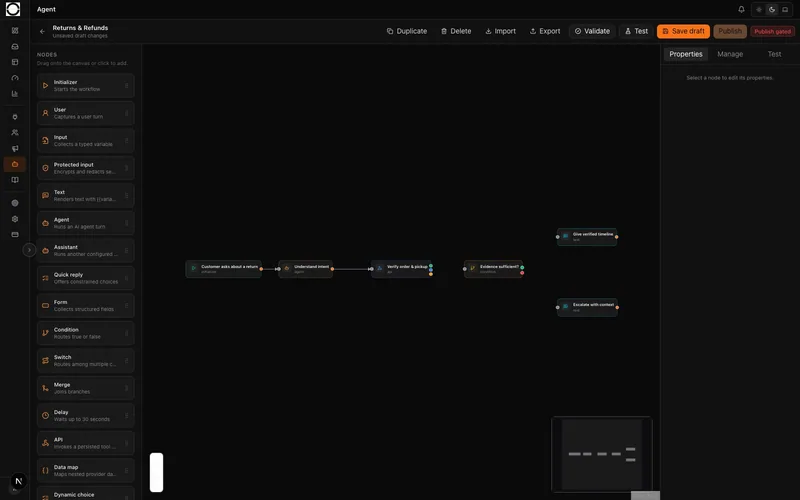
The active workflow uses approved knowledge and authorized tools. When confidence or policy boundaries are not met, it hands off instead of inventing completion.
Published workflow version
Approved knowledge
Explicit escalation branch
Resolve / L0 AgentsDemonstration data
01Decision branch02Escalation path
The workflow makes safe automation and escalation paths visible before release.
03 / Escalate
The person receives the complete support state.
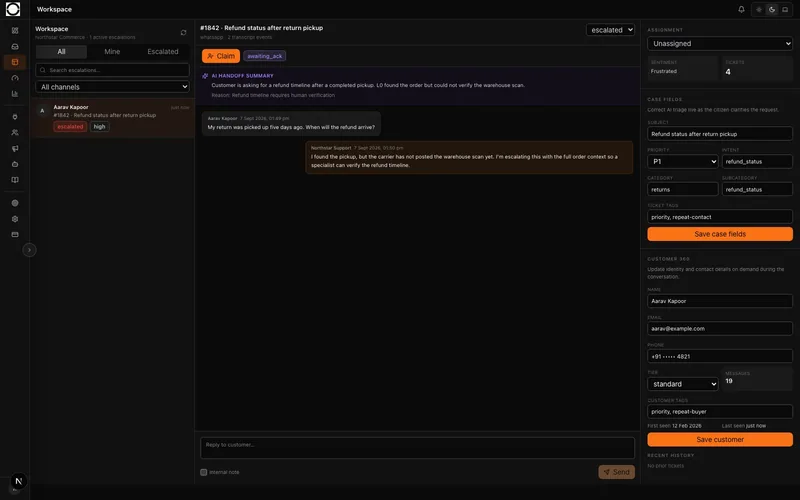
Workspace receives the transcript, reason for escalation, customer context, and case controls. An operator can claim, assign, acknowledge, and resolve the exception.
AI handoff summary
Full conversation
Customer 360 and case ownership
Escalate / WorkspaceDemonstration data
01Handoff summary02Claim path
The handoff preserves evidence so the customer does not need to repeat the story.
04 / Audit
Configured eligible work becomes quality evidence.
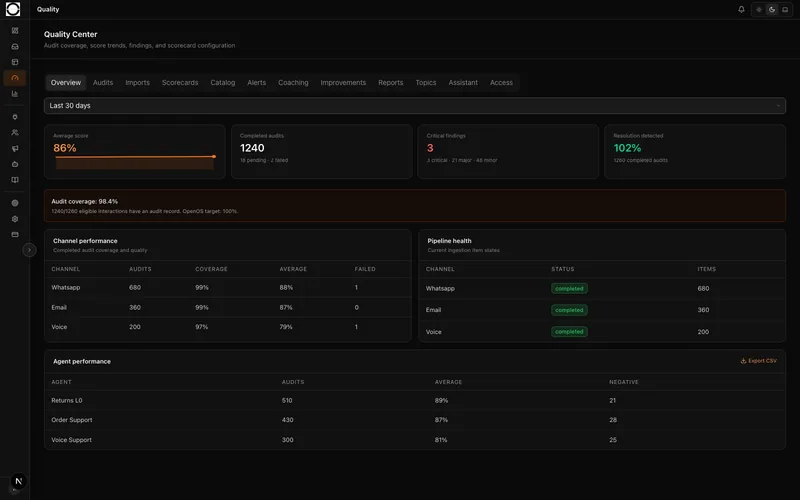
Quality applies a versioned scorecard, stores rationale and findings, and makes the eligible denominator visible. Missed work can be reconciled.
Eligible population and coverage
Criterion-level rationale
Finding and coaching path
Audit / QualityDemonstration data
01Coverage denominator02Findings
Coverage is scoped to configured, ingested, eligible interactions—not an unqualified universal claim.
05 / Decide
Trinetra frames the material pattern for action.
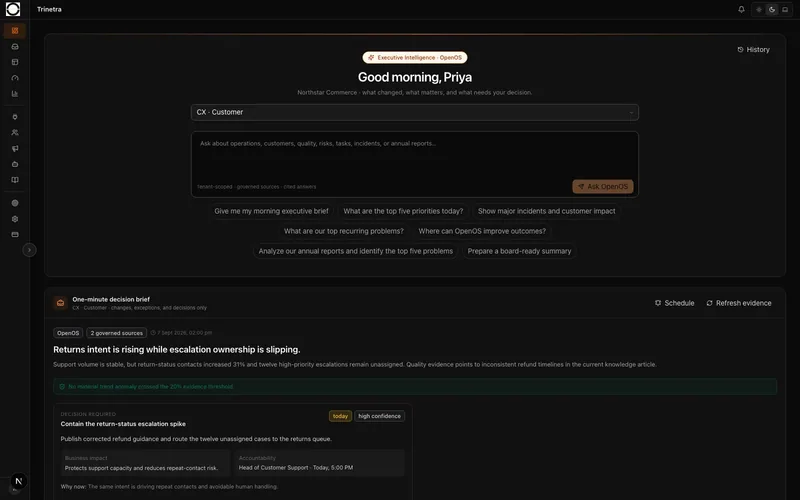
The one-minute brief correlates containment, assignment, SLA, and quality evidence. A generated Decision Card proposes an owner role, deadline, and recommendation.
Role-scoped brief
Cited evidence and assumptions
Recommendation ready for task conversion
Decide / TrinetraDemonstration data
01Material drift02Decision frame
The generated card stays distinct from the managed task created when a recommendation is selected.
The core output
A decision should carry its evidence and its boundary.
Trinetra generates a structured Decision Card—not a notification and not a hidden autonomous action.
The card makes the issue, impact, evidence, assumptions, recommendation, proposed owner role, deadline, and confidence inspectable.
01
Evidence before assertionSources, assumptions, and risk stay available for review.
02
Recommendation before executionThe next action is explicit and bounded by the supported workflow.
03
Task after selectionNamed assignment and lifecycle status belong to managed work, not the generated card.
Connect through provider APIs, webhooks, and scoped implementation.
CCaaS & helpdesk
Zendesk
Freshdesk
ServiceNow
Genesys
NICE CXone
Five9
Talkdesk
CPaaS & channels
Twilio
Gupshup
Exotel
Infobip
Sinch
Meta / WhatsApp
Sarvam AI
CRM, ERP & commerce
Salesforce
SAP
Oracle
Microsoft Dynamics 365
HubSpot
Zoho
Shopify
Tally
Logos identify commonly operated systems, not partnerships or preconfigured native connectors.
Connection scope depends on provider APIs, permissions, credentials, and deployment requirements.
How OpenOS connects
Integrations are the eyes and governed hands—not a replacement stack.
Providers execute delivery. Systems of record stay authoritative. OpenOS normalizes evidence and invokes only configured, authorized paths.
01
Customer channels
Implemented paths cover web chat, website forms, Google Workspace email, and Amcos WhatsApp. Meta WhatsApp is activated with the required customer credentials and provider approval.
02
Voice providers
Sarvam managed voice and Exotel paths are enabled through controlled provider configuration, preflight, and customer acceptance.
03
Operational systems
Scoped HTTPS APIs, webhooks, scheduled JSON ingestion, and governed HTTP tools connect systems that do not yet have a packaged adapter.
Tenant boundaries, role-scoped access, secret references, evidence trails, approval controls on supported workflows, and explicit claim boundaries are part of how OpenOS operates.